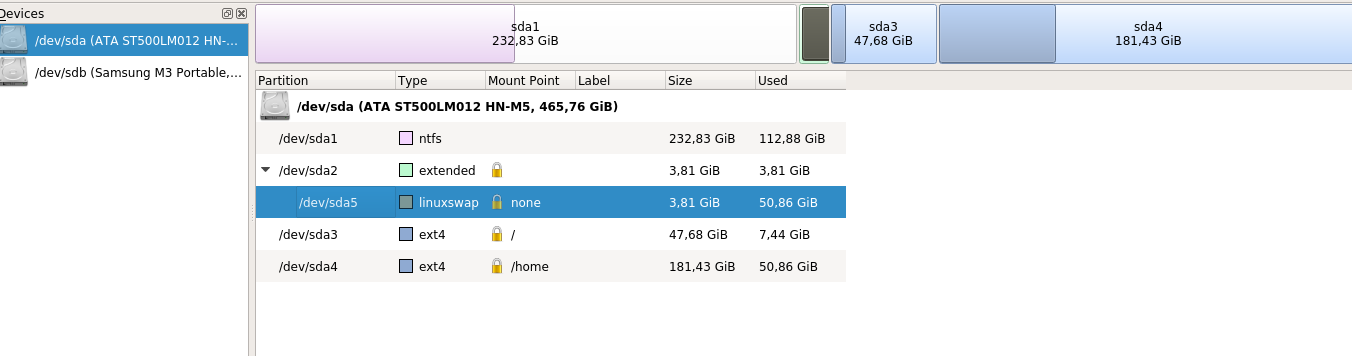
Έκανα format και έβαλα τα kubuntu, βάζοντας τα /, /home, swap (4GB) σε ξεχωριστα partitions.
Κάτι πήγε στραβά κατα το partitioning, εκάζω. Ως αποτέλεσμα, κατα το installation μου έβγαλε ενα σφάλμα, δεν θυμάμαι τι :/.
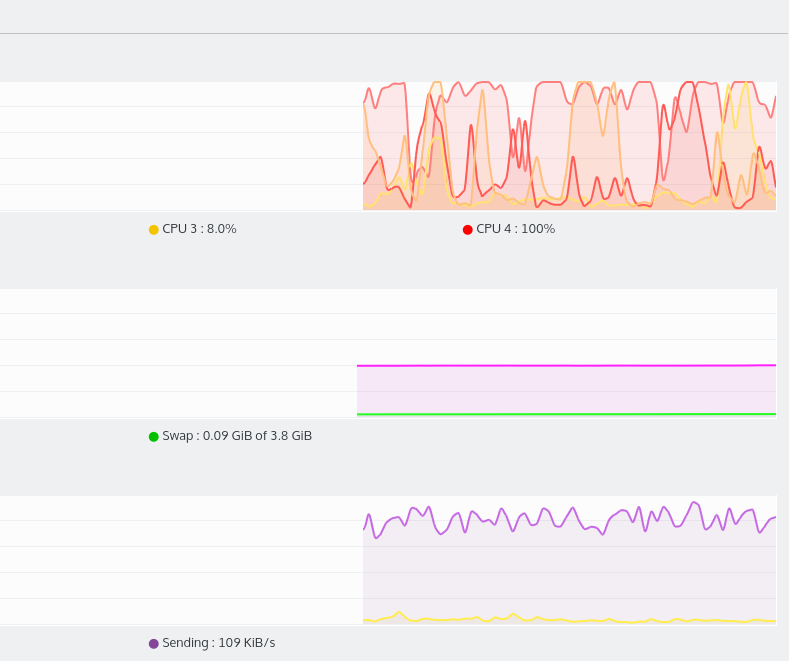
Τώρα έχω μεγάλα κολλήματα κατά το paste/move μεγάλων αρχείων, λες και το σύστημα δουλεύει τρελά.
Επιπλέον πετάγονται στην τύχη errors.Πχ τωρα εκανα boot, μου εβγαλε ενα μηνυμα (που δεν θυμαμαι τι ηταν :/:/ , κατι σχετικα με τον bootloader), και να πατησω alt ctrl del to reboot.
Είδα στο νετ σε παρόμοια προβλήματα οτι τα outputs των παρακατω βοηθουν:
sudo fdisk -l, οπου μου βγάζει το
Partition 2 does not start on physical sector boundary.
στο stderr.
- Κώδικας: Επιλογή όλων
Disk /dev/ram0: 64 MiB, 67108864 bytes, 131072 sectors
Units: sectors of 1 * 512 = 512 bytes
Sector size (logical/physical): 512 bytes / 4096 bytes
I/O size (minimum/optimal): 4096 bytes / 4096 bytes


Disk /dev/ram1: 64 MiB, 67108864 bytes, 131072 sectors
Units: sectors of 1 * 512 = 512 bytes
Sector size (logical/physical): 512 bytes / 4096 bytes
I/O size (minimum/optimal): 4096 bytes / 4096 bytes


Disk /dev/ram2: 64 MiB, 67108864 bytes, 131072 sectors
Units: sectors of 1 * 512 = 512 bytes
Sector size (logical/physical): 512 bytes / 4096 bytes
I/O size (minimum/optimal): 4096 bytes / 4096 bytes


Disk /dev/ram3: 64 MiB, 67108864 bytes, 131072 sectors
Units: sectors of 1 * 512 = 512 bytes
Sector size (logical/physical): 512 bytes / 4096 bytes
I/O size (minimum/optimal): 4096 bytes / 4096 bytes


Disk /dev/ram4: 64 MiB, 67108864 bytes, 131072 sectors
Units: sectors of 1 * 512 = 512 bytes
Sector size (logical/physical): 512 bytes / 4096 bytes
I/O size (minimum/optimal): 4096 bytes / 4096 bytes


Disk /dev/ram5: 64 MiB, 67108864 bytes, 131072 sectors
Units: sectors of 1 * 512 = 512 bytes
Sector size (logical/physical): 512 bytes / 4096 bytes
I/O size (minimum/optimal): 4096 bytes / 4096 bytes


Disk /dev/ram6: 64 MiB, 67108864 bytes, 131072 sectors
Units: sectors of 1 * 512 = 512 bytes
Sector size (logical/physical): 512 bytes / 4096 bytes
I/O size (minimum/optimal): 4096 bytes / 4096 bytes


Disk /dev/ram7: 64 MiB, 67108864 bytes, 131072 sectors
Units: sectors of 1 * 512 = 512 bytes
Sector size (logical/physical): 512 bytes / 4096 bytes
I/O size (minimum/optimal): 4096 bytes / 4096 bytes


Disk /dev/ram8: 64 MiB, 67108864 bytes, 131072 sectors
Units: sectors of 1 * 512 = 512 bytes
Sector size (logical/physical): 512 bytes / 4096 bytes
I/O size (minimum/optimal): 4096 bytes / 4096 bytes


Disk /dev/ram9: 64 MiB, 67108864 bytes, 131072 sectors
Units: sectors of 1 * 512 = 512 bytes
Sector size (logical/physical): 512 bytes / 4096 bytes
I/O size (minimum/optimal): 4096 bytes / 4096 bytes


Disk /dev/ram10: 64 MiB, 67108864 bytes, 131072 sectors
Units: sectors of 1 * 512 = 512 bytes
Sector size (logical/physical): 512 bytes / 4096 bytes
I/O size (minimum/optimal): 4096 bytes / 4096 bytes


Disk /dev/ram11: 64 MiB, 67108864 bytes, 131072 sectors
Units: sectors of 1 * 512 = 512 bytes
Sector size (logical/physical): 512 bytes / 4096 bytes
I/O size (minimum/optimal): 4096 bytes / 4096 bytes


Disk /dev/ram12: 64 MiB, 67108864 bytes, 131072 sectors
Units: sectors of 1 * 512 = 512 bytes
Sector size (logical/physical): 512 bytes / 4096 bytes
I/O size (minimum/optimal): 4096 bytes / 4096 bytes


Disk /dev/ram13: 64 MiB, 67108864 bytes, 131072 sectors
Units: sectors of 1 * 512 = 512 bytes
Sector size (logical/physical): 512 bytes / 4096 bytes
I/O size (minimum/optimal): 4096 bytes / 4096 bytes


Disk /dev/ram14: 64 MiB, 67108864 bytes, 131072 sectors
Units: sectors of 1 * 512 = 512 bytes
Sector size (logical/physical): 512 bytes / 4096 bytes
I/O size (minimum/optimal): 4096 bytes / 4096 bytes


Disk /dev/ram15: 64 MiB, 67108864 bytes, 131072 sectors
Units: sectors of 1 * 512 = 512 bytes
Sector size (logical/physical): 512 bytes / 4096 bytes
I/O size (minimum/optimal): 4096 bytes / 4096 bytes


Disk /dev/sda: 465,8 GiB, 500107862016 bytes, 976773168 sectors
Units: sectors of 1 * 512 = 512 bytes
Sector size (logical/physical): 512 bytes / 4096 bytes
I/O size (minimum/optimal): 4096 bytes / 4096 bytes
Disklabel type: dos
Disk identifier: 0xfc5875ed

Device     Boot     Start       End   Sectors   Size Id Type
/dev/sda1  *         2048 488282111 488280064 232,9G  7 HPFS/NTFS/exFAT
/dev/sda2       488284158 496281599   7997442   3,8G  5 Extended
/dev/sda3       496281600 596281343  99999744  47,7G 83 Linux
/dev/sda4       596281344 976771071 380489728 181,4G 83 Linux
/dev/sda5       488284160 496281599   7997440   3,8G 82 Linux swap / Solaris

Partition 2 does not start on physical sector boundary.
Partition table entries are not in disk order.


Disk /dev/sdb: 931,5 GiB, 1000204886016 bytes, 1953525168 sectors
Units: sectors of 1 * 512 = 512 bytes
Sector size (logical/physical): 512 bytes / 512 bytes
I/O size (minimum/optimal): 512 bytes / 512 bytes
Disklabel type: dos
Disk identifier: 0x0c2a8970

Device     Boot Start        End    Sectors   Size Id Type
/dev/sdb1  *       64 1953520064 1953520001 931,5G  7 HPFS/NTFS/exFAT
sudo lshw , τα του δίσκου:
- Κώδικας: Επιλογή όλων
*-scsi:0
          physical id: 2
          logical name: scsi0
          capabilities: emulated
        *-disk
             description: ATA Disk
             product: ST500LM012 HN-M5
             vendor: Seagate
             physical id: 0.0.0
             bus info: scsi@0:0.0.0
             logical name: /dev/sda
             version: 0002
             serial: S2RSJ9DD120410
             size: 465GiB (500GB)
             capabilities: partitioned partitioned:dos
             configuration: ansiversion=5 logicalsectorsize=512 sectorsize=4096 signature=fc5875ed
           *-volume:0
                description: Windows NTFS volume
                physical id: 1
                bus info: scsi@0:0.0.0,1
                logical name: /dev/sda1
                version: 3.1
                serial: 58af4384-b527-8642-a62e-45dc9e0d8d58
                size: 232GiB
                capacity: 232GiB
                capabilities: primary bootable ntfs initialized
                configuration: clustersize=4096 created=2015-05-21 08:27:30 filesystem=ntfs state=clean
           *-volume:1
                description: Extended partition
                physical id: 2
                bus info: scsi@0:0.0.0,2
                logical name: /dev/sda2
                size: 3905MiB
                capacity: 3905MiB
                capabilities: primary extended partitioned partitioned:extended
              *-logicalvolume
                   description: Linux swap / Solaris partition
                   physical id: 5
                   logical name: /dev/sda5
                   capacity: 3905MiB
                   capabilities: nofs
           *-volume:2
                description: EXT4 volume
                vendor: Linux
                physical id: 3
                bus info: scsi@0:0.0.0,3
                logical name: /dev/sda3
                logical name: /
                version: 1.0
                serial: 4d5f7a71-152b-4c59-a003-82dc1efade40
                size: 47GiB
                capacity: 47GiB
                capabilities: primary journaled extended_attributes large_files huge_files dir_nlink recover extents ext4 ext2 initialized
                configuration: created=2015-11-04 20:06:26 filesystem=ext4 lastmountpoint=/ modified=2015-11-08 16:00:12 mount.fstype=ext4 mount.options=rw,relatime,errors=remount-ro,data=ordered mounted=2015-11-08 14:00:16 state=mounted
           *-volume:3
                description: EXT4 volume
                vendor: Linux
                physical id: 4
                bus info: scsi@0:0.0.0,4
                logical name: /dev/sda4
                logical name: /home
                version: 1.0
                serial: 1a224167-a896-46a8-aaf2-50816368d4e2
                size: 181GiB
                capacity: 181GiB
                capabilities: primary journaled extended_attributes large_files huge_files dir_nlink recover extents ext4 ext2 initialized
                configuration: created=2015-11-04 20:06:28 filesystem=ext4 lastmountpoint=/home modified=2015-11-08 14:00:20 mount.fstype=ext4 mount.options=rw,relatime,data=ordered mounted=2015-11-08 14:00:20 state=mounted
[...]
Screenshots απο το KDE partition manager,
και το system load κατα το extraction ενος 6.6 GB iso οπου κολλουσε το συμπαν.