- Κώδικας: Επιλογή όλων
sudo apt-get update

Δεν μπορώ να αναβαθμίσω στο HWE του utopic 
Συντονιστής: adem1
Κανόνες Δ. Συζήτησης
Στην ενότητα αυτή γράφουμε θέματα/ προβλήματα μόνο για το UBUNTU ή τα παράγωγά του.
Στην ενότητα αυτή γράφουμε θέματα/ προβλήματα μόνο για το UBUNTU ή τα παράγωγά του.
25 Δημοσιεύσεις
• Σελίδα 2 από 3 • 1, 2, 3
Re: Δεν μπορώ να αναβαθμίσω στο HWE του utopic
 από sotos21 » 26 Φεβ 2015, 22:34
Θέλω μόλις τελειώσεις και μετά την επανεκκίνηση να δείξεις πάλι την
1 Γνώσεις Linux: Πρώτα βήματα ┃ Προγραμματισμού: Καθόλου ┃ Αγγλικών: Καθόλου
2 Ubuntu 23.10 Mantic Minotaur 6.3.0-7-generic 64bit (el_GR.UTF-8, Unity:Unity7:ubuntu unity)
3 AMD Ryzen 7 7730U with Radeon Graphics ‖ RAM 15368 MiB ‖ASUS TN3604YA - ASUS Vivobook_S_Flip TN3604YA_TN3604YA
4 Advanced Micro Devices, Inc. [AMD/ATI] Barcelo [1002:15e7] {amdgpu}
5 wlp1s0: MEDIATEK Corp. Device [14c3:7922]
2 Ubuntu 23.10 Mantic Minotaur 6.3.0-7-generic 64bit (el_GR.UTF-8, Unity:Unity7:ubuntu unity)
3 AMD Ryzen 7 7730U with Radeon Graphics ‖ RAM 15368 MiB ‖ASUS TN3604YA - ASUS Vivobook_S_Flip TN3604YA_TN3604YA
4 Advanced Micro Devices, Inc. [AMD/ATI] Barcelo [1002:15e7] {amdgpu}
5 wlp1s0: MEDIATEK Corp. Device [14c3:7922]
-

sotos21 - Freedom

- Δημοσιεύσεις: 6304
- Εγγραφή: 21 Φεβ 2011, 21:28
- Τοποθεσία: Αθήνα
Re: Δεν μπορώ να αναβαθμίσω στο HWE του utopic
από madvinegar » 26 Φεβ 2015, 22:47
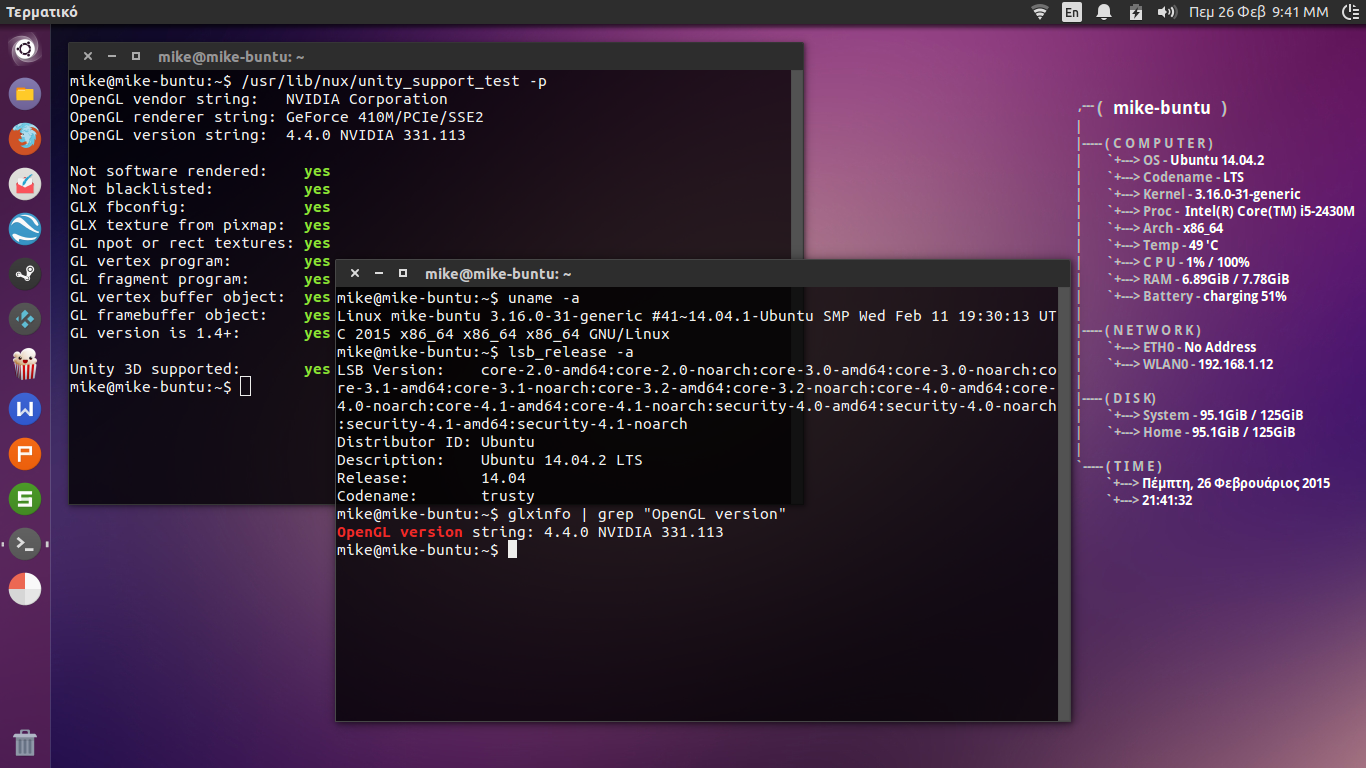
Ολα καλά Σωτηρη. Αναβαθμισε, εκανα επανεκκινηση και μπηκε πλεον με τον 3.16.
Μου απεγκατεστησε μονο το skype. Δεν ξερω γιατι...
Tον οδηγο της nvidia να τον αφησω στο 331 οπως ειναι? Τί λες...?
Το αποτελεσμα του apt-get ειναι
Μου απεγκατεστησε μονο το skype. Δεν ξερω γιατι...
Tον οδηγο της nvidia να τον αφησω στο 331 οπως ειναι? Τί λες...?
Το αποτελεσμα του apt-get ειναι
- Κώδικας: Επιλογή όλων
mike@mike-buntu:~$ sudo apt-get update
[sudo] password for mike:
Hit http://repo.steampowered.com precise InRelease
Αγνόησε http://gr.archive.ubuntu.com trusty InRelease
Αγνόησε http://gr.archive.ubuntu.com trusty-updates InRelease
Αγνόησε http://archive.canonical.com trusty InRelease
Αγνόησε http://ppa.launchpad.net trusty InRelease
Αγνόησε http://gr.archive.ubuntu.com trusty-backports InRelease
Hit http://gr.archive.ubuntu.com trusty Release.gpg
Αγνόησε http://dl.google.com stable InRelease
Αγνόησε http://extras.ubuntu.com trusty InRelease
Hit http://gr.archive.ubuntu.com trusty-updates Release.gpg
Hit http://archive.canonical.com trusty Release.gpg
Αγνόησε http://ppa.launchpad.net trusty InRelease
Hit http://gr.archive.ubuntu.com trusty-backports Release.gpg
Hit http://gr.archive.ubuntu.com trusty Release
Hit http://extras.ubuntu.com trusty Release.gpg
Αγνόησε http://dl.google.com stable InRelease
Hit http://gr.archive.ubuntu.com trusty-updates Release
Hit http://archive.canonical.com trusty Release
Αγνόησε http://ppa.launchpad.net trusty InRelease
Hit http://gr.archive.ubuntu.com trusty-backports Release
Hit http://gr.archive.ubuntu.com trusty/main Sources
Hit http://extras.ubuntu.com trusty Release
Hit http://gr.archive.ubuntu.com trusty/restricted Sources
Hit http://dl.google.com stable Release.gpg
Hit http://archive.canonical.com trusty/partner Sources
Αγνόησε http://ppa.launchpad.net trusty InRelease
Hit http://gr.archive.ubuntu.com trusty/universe Sources
Hit http://gr.archive.ubuntu.com trusty/multiverse Sources
Αγνόησε http://archive.ubuntu.com trusty-proposed InRelease
Αγνόησε http://security.ubuntu.com trusty-security InRelease
Hit http://extras.ubuntu.com trusty/main Sources
Hit http://gr.archive.ubuntu.com trusty/main amd64 Packages
Hit http://dl.google.com stable Release.gpg
Hit http://archive.canonical.com trusty/partner amd64 Packages
Hit http://ppa.launchpad.net trusty Release.gpg
Hit http://gr.archive.ubuntu.com trusty/restricted amd64 Packages
Hit http://gr.archive.ubuntu.com trusty/universe amd64 Packages
Hit http://extras.ubuntu.com trusty/main amd64 Packages
Hit http://gr.archive.ubuntu.com trusty/multiverse amd64 Packages
Hit http://dl.google.com stable Release
Hit http://archive.canonical.com trusty/partner i386 Packages
Hit http://ppa.launchpad.net trusty Release.gpg
Hit http://gr.archive.ubuntu.com trusty/main i386 Packages
Hit http://gr.archive.ubuntu.com trusty/restricted i386 Packages
Hit http://extras.ubuntu.com trusty/main i386 Packages
Hit http://archive.ubuntu.com trusty-proposed Release.gpg
Hit http://dl.google.com stable Release
Hit http://ppa.launchpad.net trusty Release.gpg
Hit http://security.ubuntu.com trusty-security Release.gpg
Hit http://repo.steampowered.com precise/steam Sources
Hit http://gr.archive.ubuntu.com trusty/universe i386 Packages
Hit http://gr.archive.ubuntu.com trusty/multiverse i386 Packages
Hit http://dl.google.com stable/main amd64 Packages
Hit http://ppa.launchpad.net trusty Release.gpg
Hit http://gr.archive.ubuntu.com trusty/main Translation-el
Hit http://gr.archive.ubuntu.com trusty/main Translation-en
Αγνόησε http://archive.canonical.com trusty/partner Translation-en
Hit http://ppa.launchpad.net trusty Release
Hit http://dl.google.com stable/main i386 Packages
Hit http://archive.ubuntu.com trusty-proposed Release
Hit http://gr.archive.ubuntu.com trusty/multiverse Translation-el
Hit http://security.ubuntu.com trusty-security Release
Hit http://gr.archive.ubuntu.com trusty/multiverse Translation-en
Hit http://ppa.launchpad.net trusty Release
Hit http://gr.archive.ubuntu.com trusty/restricted Translation-el
Hit http://gr.archive.ubuntu.com trusty/restricted Translation-en
Hit http://ppa.launchpad.net trusty Release
Hit http://gr.archive.ubuntu.com trusty/universe Translation-el
Hit http://archive.ubuntu.com trusty-proposed/main amd64 Packages
Hit http://gr.archive.ubuntu.com trusty/universe Translation-en
Hit http://ppa.launchpad.net trusty Release
Hit http://security.ubuntu.com trusty-security/main Sources
Hit http://gr.archive.ubuntu.com trusty-updates/main Sources
Hit http://gr.archive.ubuntu.com trusty-updates/restricted Sources
Hit http://gr.archive.ubuntu.com trusty-updates/universe Sources
Hit http://repo.steampowered.com precise/steam amd64 Packages
Hit http://ppa.launchpad.net trusty/main amd64 Packages
Hit http://gr.archive.ubuntu.com trusty-updates/multiverse Sources
Hit http://dl.google.com stable/main amd64 Packages
Hit http://gr.archive.ubuntu.com trusty-updates/main amd64 Packages
Hit http://archive.ubuntu.com trusty-proposed/restricted amd64 Packages
Hit http://ppa.launchpad.net trusty/main i386 Packages
Hit http://dl.google.com stable/main i386 Packages
Hit http://security.ubuntu.com trusty-security/restricted Sources
Hit http://gr.archive.ubuntu.com trusty-updates/restricted amd64 Packages
Hit http://gr.archive.ubuntu.com trusty-updates/universe amd64 Packages
Hit http://ppa.launchpad.net trusty/main Translation-en
Hit http://gr.archive.ubuntu.com trusty-updates/multiverse amd64 Packages
Hit http://gr.archive.ubuntu.com trusty-updates/main i386 Packages
Hit http://gr.archive.ubuntu.com trusty-updates/restricted i386 Packages
Hit http://ppa.launchpad.net trusty/main amd64 Packages
Hit http://gr.archive.ubuntu.com trusty-updates/universe i386 Packages
Hit http://archive.ubuntu.com trusty-proposed/main i386 Packages
Hit http://gr.archive.ubuntu.com trusty-updates/multiverse i386 Packages
Hit http://gr.archive.ubuntu.com trusty-updates/main Translation-en
Hit http://security.ubuntu.com trusty-security/universe Sources
Hit http://ppa.launchpad.net trusty/main i386 Packages
Hit http://gr.archive.ubuntu.com trusty-updates/multiverse Translation-en
Hit http://gr.archive.ubuntu.com trusty-updates/restricted Translation-en
Hit http://ppa.launchpad.net trusty/main Translation-en
Hit http://gr.archive.ubuntu.com trusty-updates/universe Translation-en
Hit http://gr.archive.ubuntu.com trusty-backports/main Sources
Hit http://archive.ubuntu.com trusty-proposed/restricted i386 Packages
Hit http://gr.archive.ubuntu.com trusty-backports/restricted Sources
Hit http://gr.archive.ubuntu.com trusty-backports/universe Sources
Hit http://gr.archive.ubuntu.com trusty-backports/multiverse Sources
Hit http://security.ubuntu.com trusty-security/multiverse Sources
Αγνόησε http://extras.ubuntu.com trusty/main Translation-el_GR
Hit http://gr.archive.ubuntu.com trusty-backports/main amd64 Packages
Hit http://gr.archive.ubuntu.com trusty-backports/restricted amd64 Packages
Hit http://gr.archive.ubuntu.com trusty-backports/universe amd64 Packages
Hit http://ppa.launchpad.net trusty/main amd64 Packages
Αγνόησε http://extras.ubuntu.com trusty/main Translation-el
Hit http://archive.ubuntu.com trusty-proposed/main Translation-el
Hit http://gr.archive.ubuntu.com trusty-backports/multiverse amd64 Packages
Hit http://ppa.launchpad.net trusty/main i386 Packages
Αγνόησε http://extras.ubuntu.com trusty/main Translation-en
Hit http://gr.archive.ubuntu.com trusty-backports/main i386 Packages
Hit http://gr.archive.ubuntu.com trusty-backports/restricted i386 Packages
Hit http://security.ubuntu.com trusty-security/main amd64 Packages
Hit http://ppa.launchpad.net trusty/main Translation-en
Hit http://gr.archive.ubuntu.com trusty-backports/universe i386 Packages
Hit http://gr.archive.ubuntu.com trusty-backports/multiverse i386 Packages
Hit http://gr.archive.ubuntu.com trusty-backports/main Translation-en
Hit http://archive.ubuntu.com trusty-proposed/main Translation-en
Hit http://ppa.launchpad.net trusty/main amd64 Packages
Hit http://gr.archive.ubuntu.com trusty-backports/multiverse Translation-en
Hit http://gr.archive.ubuntu.com trusty-backports/restricted Translation-en
Hit http://gr.archive.ubuntu.com trusty-backports/universe Translation-en
Hit http://ppa.launchpad.net trusty/main i386 Packages
Hit http://security.ubuntu.com trusty-security/restricted amd64 Packages
Hit http://ppa.launchpad.net trusty/main Translation-en
Hit http://archive.ubuntu.com trusty-proposed/restricted Translation-el
Hit http://security.ubuntu.com trusty-security/universe amd64 Packages
Hit http://archive.ubuntu.com trusty-proposed/restricted Translation-en
Αγνόησε http://gr.archive.ubuntu.com trusty/main Translation-el_GR
Αγνόησε http://gr.archive.ubuntu.com trusty/multiverse Translation-el_GR
Hit http://security.ubuntu.com trusty-security/multiverse amd64 Packages
Αγνόησε http://gr.archive.ubuntu.com trusty/restricted Translation-el_GR
Αγνόησε http://gr.archive.ubuntu.com trusty/universe Translation-el_GR
Hit http://security.ubuntu.com trusty-security/main i386 Packages
Hit http://repo.steampowered.com precise/steam i386 Packages
Hit http://security.ubuntu.com trusty-security/restricted i386 Packages
Hit http://security.ubuntu.com trusty-security/universe i386 Packages
Αγνόησε http://dl.google.com stable/main Translation-el_GR
Hit http://security.ubuntu.com trusty-security/multiverse i386 Packages
Αγνόησε http://dl.google.com stable/main Translation-el
Αγνόησε http://dl.google.com stable/main Translation-en
Αγνόησε http://dl.google.com stable/main Translation-el_GR
Hit http://security.ubuntu.com trusty-security/main Translation-en
Αγνόησε http://dl.google.com stable/main Translation-el
Hit http://security.ubuntu.com trusty-security/multiverse Translation-en
Hit http://security.ubuntu.com trusty-security/restricted Translation-en
Αγνόησε http://dl.google.com stable/main Translation-en
Hit http://security.ubuntu.com trusty-security/universe Translation-en
Αγνόησε http://repo.steampowered.com precise/steam Translation-el_GR
Αγνόησε http://repo.steampowered.com precise/steam Translation-el
Αγνόησε http://repo.steampowered.com precise/steam Translation-en
Ανάγνωση Λιστών Πακέτων... Ολοκληρώθηκε
mike@mike-buntu:~$
1 Γνώσεις Linux: Μέτριο ┃ Προγραμματισμού: Καθόλου ┃ Αγγλικών: Πολύ Καλό
2 Ubuntu 18.04 bionic beaver 4.13.0-16-generic 64bit (el_GR.UTF-8, Gnome ubuntu)
3 Intel Core2 Duo CPU T5550 1.83GHz ‖ RAM 2008 MiB ‖ Acer Chapala - Acer, inc. Aspire 5920G
4 Advanced Micro Devices, Inc. [AMD/ATI] RV620/M82 [Mobility Radeon HD 3450/3470] [1002:95c4] {radeon}
5 wlan0: Intel PRO/Wireless 3945ABG [Golan] Network Connection [8086:4222] (rev 02) ⋮ eth0: Broadcom NetLink BCM5787M Gigabit Ethernet PCI Express [14e4:1693] (rev 02)
Blog: https://madvinegar.wordpress.com/
2 Ubuntu 18.04 bionic beaver 4.13.0-16-generic 64bit (el_GR.UTF-8, Gnome ubuntu)
3 Intel Core2 Duo CPU T5550 1.83GHz ‖ RAM 2008 MiB ‖ Acer Chapala - Acer, inc. Aspire 5920G
4 Advanced Micro Devices, Inc. [AMD/ATI] RV620/M82 [Mobility Radeon HD 3450/3470] [1002:95c4] {radeon}
5 wlan0: Intel PRO/Wireless 3945ABG [Golan] Network Connection [8086:4222] (rev 02) ⋮ eth0: Broadcom NetLink BCM5787M Gigabit Ethernet PCI Express [14e4:1693] (rev 02)
Blog: https://madvinegar.wordpress.com/
-

madvinegar - superbTUX

- Δημοσιεύσεις: 3105
- Εγγραφή: 15 Ιαν 2012, 21:10
Re: Δεν μπορώ να αναβαθμίσω στο HWE του utopic
από sotos21 » 26 Φεβ 2015, 22:55
Λάθος άνθρωπο ρώτησες, την δικιά μου την έχω μόνιμα απενεργοποιημένη.
Πάντως ο 346 που δοκίμασα δούλευε καλλίτερα από τον 331, ο οποίος έκανε κάτι σπασίματα κατά την μετακίνηση παραθύρου.
Off topic:
Να ρωτήσω και τους άρχοντες του forum:
Σε εμένα τα proposed δεν φαίνονται πουθενά κατά την διάρκεια της εντολής sudo apt-get update, στου Mad γιατί φαίνονται;
Πάντως ο 346 που δοκίμασα δούλευε καλλίτερα από τον 331, ο οποίος έκανε κάτι σπασίματα κατά την μετακίνηση παραθύρου.
Off topic:
Να ρωτήσω και τους άρχοντες του forum:
Σε εμένα τα proposed δεν φαίνονται πουθενά κατά την διάρκεια της εντολής sudo apt-get update, στου Mad γιατί φαίνονται;
Τελευταία επεξεργασία από sotos21 και 26 Φεβ 2015, 23:04, έχει επεξεργασθεί 2 φορά/ες συνολικά
1 Γνώσεις Linux: Πρώτα βήματα ┃ Προγραμματισμού: Καθόλου ┃ Αγγλικών: Καθόλου
2 Ubuntu 23.10 Mantic Minotaur 6.3.0-7-generic 64bit (el_GR.UTF-8, Unity:Unity7:ubuntu unity)
3 AMD Ryzen 7 7730U with Radeon Graphics ‖ RAM 15368 MiB ‖ASUS TN3604YA - ASUS Vivobook_S_Flip TN3604YA_TN3604YA
4 Advanced Micro Devices, Inc. [AMD/ATI] Barcelo [1002:15e7] {amdgpu}
5 wlp1s0: MEDIATEK Corp. Device [14c3:7922]
2 Ubuntu 23.10 Mantic Minotaur 6.3.0-7-generic 64bit (el_GR.UTF-8, Unity:Unity7:ubuntu unity)
3 AMD Ryzen 7 7730U with Radeon Graphics ‖ RAM 15368 MiB ‖ASUS TN3604YA - ASUS Vivobook_S_Flip TN3604YA_TN3604YA
4 Advanced Micro Devices, Inc. [AMD/ATI] Barcelo [1002:15e7] {amdgpu}
5 wlp1s0: MEDIATEK Corp. Device [14c3:7922]
-
sotos21 - Freedom
- Δημοσιεύσεις: 6304
- Εγγραφή: 21 Φεβ 2011, 21:28
- Τοποθεσία: Αθήνα
Re: Δεν μπορώ να αναβαθμίσω στο HWE του utopic
από madvinegar » 26 Φεβ 2015, 22:56
Να κατεβασω το run αρχειο λες?
1 Γνώσεις Linux: Μέτριο ┃ Προγραμματισμού: Καθόλου ┃ Αγγλικών: Πολύ Καλό
2 Ubuntu 18.04 bionic beaver 4.13.0-16-generic 64bit (el_GR.UTF-8, Gnome ubuntu)
3 Intel Core2 Duo CPU T5550 1.83GHz ‖ RAM 2008 MiB ‖ Acer Chapala - Acer, inc. Aspire 5920G
4 Advanced Micro Devices, Inc. [AMD/ATI] RV620/M82 [Mobility Radeon HD 3450/3470] [1002:95c4] {radeon}
5 wlan0: Intel PRO/Wireless 3945ABG [Golan] Network Connection [8086:4222] (rev 02) ⋮ eth0: Broadcom NetLink BCM5787M Gigabit Ethernet PCI Express [14e4:1693] (rev 02)
Blog: https://madvinegar.wordpress.com/
2 Ubuntu 18.04 bionic beaver 4.13.0-16-generic 64bit (el_GR.UTF-8, Gnome ubuntu)
3 Intel Core2 Duo CPU T5550 1.83GHz ‖ RAM 2008 MiB ‖ Acer Chapala - Acer, inc. Aspire 5920G
4 Advanced Micro Devices, Inc. [AMD/ATI] RV620/M82 [Mobility Radeon HD 3450/3470] [1002:95c4] {radeon}
5 wlan0: Intel PRO/Wireless 3945ABG [Golan] Network Connection [8086:4222] (rev 02) ⋮ eth0: Broadcom NetLink BCM5787M Gigabit Ethernet PCI Express [14e4:1693] (rev 02)
Blog: https://madvinegar.wordpress.com/
-
madvinegar - superbTUX
- Δημοσιεύσεις: 3105
- Εγγραφή: 15 Ιαν 2012, 21:10
Re: Δεν μπορώ να αναβαθμίσω στο HWE του utopic
από sotos21 » 26 Φεβ 2015, 23:01
madvinegar έγραψε:Να κατεβασω το run αρχειο λες?
Σε εμένα είναι στο synaptic.
Off topic:
Άσχετο αλλά έτσι υποβαθμίζουμε τα proposed http://www.webupd8.org/2013/11/how-to-downgrade-proposed-repository.html
1 Γνώσεις Linux: Πρώτα βήματα ┃ Προγραμματισμού: Καθόλου ┃ Αγγλικών: Καθόλου
2 Ubuntu 23.10 Mantic Minotaur 6.3.0-7-generic 64bit (el_GR.UTF-8, Unity:Unity7:ubuntu unity)
3 AMD Ryzen 7 7730U with Radeon Graphics ‖ RAM 15368 MiB ‖ASUS TN3604YA - ASUS Vivobook_S_Flip TN3604YA_TN3604YA
4 Advanced Micro Devices, Inc. [AMD/ATI] Barcelo [1002:15e7] {amdgpu}
5 wlp1s0: MEDIATEK Corp. Device [14c3:7922]
2 Ubuntu 23.10 Mantic Minotaur 6.3.0-7-generic 64bit (el_GR.UTF-8, Unity:Unity7:ubuntu unity)
3 AMD Ryzen 7 7730U with Radeon Graphics ‖ RAM 15368 MiB ‖ASUS TN3604YA - ASUS Vivobook_S_Flip TN3604YA_TN3604YA
4 Advanced Micro Devices, Inc. [AMD/ATI] Barcelo [1002:15e7] {amdgpu}
5 wlp1s0: MEDIATEK Corp. Device [14c3:7922]
-
sotos21 - Freedom
- Δημοσιεύσεις: 6304
- Εγγραφή: 21 Φεβ 2011, 21:28
- Τοποθεσία: Αθήνα
Re: Δεν μπορώ να αναβαθμίσω στο HWE του utopic
από madvinegar » 26 Φεβ 2015, 23:04
Thanx για την βοηθεια Σωτηρη! Καλο βραδυ!
1 Γνώσεις Linux: Μέτριο ┃ Προγραμματισμού: Καθόλου ┃ Αγγλικών: Πολύ Καλό
2 Ubuntu 18.04 bionic beaver 4.13.0-16-generic 64bit (el_GR.UTF-8, Gnome ubuntu)
3 Intel Core2 Duo CPU T5550 1.83GHz ‖ RAM 2008 MiB ‖ Acer Chapala - Acer, inc. Aspire 5920G
4 Advanced Micro Devices, Inc. [AMD/ATI] RV620/M82 [Mobility Radeon HD 3450/3470] [1002:95c4] {radeon}
5 wlan0: Intel PRO/Wireless 3945ABG [Golan] Network Connection [8086:4222] (rev 02) ⋮ eth0: Broadcom NetLink BCM5787M Gigabit Ethernet PCI Express [14e4:1693] (rev 02)
Blog: https://madvinegar.wordpress.com/
2 Ubuntu 18.04 bionic beaver 4.13.0-16-generic 64bit (el_GR.UTF-8, Gnome ubuntu)
3 Intel Core2 Duo CPU T5550 1.83GHz ‖ RAM 2008 MiB ‖ Acer Chapala - Acer, inc. Aspire 5920G
4 Advanced Micro Devices, Inc. [AMD/ATI] RV620/M82 [Mobility Radeon HD 3450/3470] [1002:95c4] {radeon}
5 wlan0: Intel PRO/Wireless 3945ABG [Golan] Network Connection [8086:4222] (rev 02) ⋮ eth0: Broadcom NetLink BCM5787M Gigabit Ethernet PCI Express [14e4:1693] (rev 02)
Blog: https://madvinegar.wordpress.com/
-
madvinegar - superbTUX
- Δημοσιεύσεις: 3105
- Εγγραφή: 15 Ιαν 2012, 21:10
Re: Δεν μπορώ να αναβαθμίσω στο HWE του utopic
από sotos21 » 01 Μαρ 2015, 08:46
Ξαναρωτάω για να μην χαθεί
Έχει σημασία για το πως δίνουμε βοήθεια.
Όταν κάποιος έπαιρνε το "ανεπίλυτες εξαρτήσεις" μήνυμα, ζήταγα την εντολή για να δω αν έχει τα proposed ενεργοποιημένα, τώρα ο Mike μου το χάλασε(ως συνήθως) γιατί φαίνονται στην εντολή αλλά δεν τα έχει ενεργοποιημένα.
sotos21 έγραψε:Να ρωτήσω και τους άρχοντες του forum:
Σε εμένα τα proposed δεν φαίνονται πουθενά κατά την διάρκεια της εντολής sudo apt-get update, στου Mad γιατί φαίνονται;
Έχει σημασία για το πως δίνουμε βοήθεια.
Όταν κάποιος έπαιρνε το "ανεπίλυτες εξαρτήσεις" μήνυμα, ζήταγα την εντολή για να δω αν έχει τα proposed ενεργοποιημένα, τώρα ο Mike μου το χάλασε(ως συνήθως) γιατί φαίνονται στην εντολή αλλά δεν τα έχει ενεργοποιημένα.
1 Γνώσεις Linux: Πρώτα βήματα ┃ Προγραμματισμού: Καθόλου ┃ Αγγλικών: Καθόλου
2 Ubuntu 23.10 Mantic Minotaur 6.3.0-7-generic 64bit (el_GR.UTF-8, Unity:Unity7:ubuntu unity)
3 AMD Ryzen 7 7730U with Radeon Graphics ‖ RAM 15368 MiB ‖ASUS TN3604YA - ASUS Vivobook_S_Flip TN3604YA_TN3604YA
4 Advanced Micro Devices, Inc. [AMD/ATI] Barcelo [1002:15e7] {amdgpu}
5 wlp1s0: MEDIATEK Corp. Device [14c3:7922]
2 Ubuntu 23.10 Mantic Minotaur 6.3.0-7-generic 64bit (el_GR.UTF-8, Unity:Unity7:ubuntu unity)
3 AMD Ryzen 7 7730U with Radeon Graphics ‖ RAM 15368 MiB ‖ASUS TN3604YA - ASUS Vivobook_S_Flip TN3604YA_TN3604YA
4 Advanced Micro Devices, Inc. [AMD/ATI] Barcelo [1002:15e7] {amdgpu}
5 wlp1s0: MEDIATEK Corp. Device [14c3:7922]
-
sotos21 - Freedom
- Δημοσιεύσεις: 6304
- Εγγραφή: 21 Φεβ 2011, 21:28
- Τοποθεσία: Αθήνα
Re: Δεν μπορώ να αναβαθμίσω στο HWE του utopic
από Learner » 02 Μαρ 2015, 01:46
sotos21 έγραψε:
Off topic:
Άσχετο αλλά έτσι υποβαθμίζουμε τα proposed http://www.webupd8.org/2013/11/how-to-downgrade-proposed-repository.html
http://forum.ubuntu-gr.org/viewtopic.ph ... p#Topic-04
sotos21 έγραψε:Έχει σημασία για το πως δίνουμε βοήθεια.
Όταν κάποιος έπαιρνε το "ανεπίλυτες εξαρτήσεις" μήνυμα, ζήταγα την εντολή για να δω αν έχει τα proposed ενεργοποιημένα, τώρα ο Mike μου το χάλασε(ως συνήθως) γιατί φαίνονται στην εντολή αλλά δεν τα έχει ενεργοποιημένα.
- Κώδικας: Επιλογή όλων
find /etc/apt -name '*.list' -exec bash -c 'echo -e "\n$1\n"; cat -n "$1"' _ '{}' \;
τα αποτελέσματα της παραπάνω εντολής είναι πιο αξιόπιστα από το αντίστοιχο GUI που δείχνει αν τα proposed είναι ενεργοποιημένα ή όχι.
-

Learner - Συντονιστής

- Δημοσιεύσεις: 9766
- Εγγραφή: 08 Νοέμ 2010, 21:24
- Τοποθεσία: Αθήνα
- Launchpad: nicktux
- IRC: NickTux
Re: Δεν μπορώ να αναβαθμίσω στο HWE του utopic
από sotos21 » 02 Μαρ 2015, 07:33
Mad Δείξε σε παρακαλώ την
Νίκο ευχαριστώ για την απάντηση.
Η απορία μου όμως βασικά είναι αν η sudo apt-get update είναι λάθος - αναξιόπιστη και όχι το GUI
Με άλλα λόγια εμφανίζονται τα proposed σε κάποιον συμφορουμίτη στην
Ίσως ο Mad έχει κάποιο άλλο φάκελο μέσα στο /etc/apt που να υπάρχουν τα proposed, γιατί στον /etc/apt/sources.list που έδειξε στην προηγούμενη σελίδα δεν υπάρχουν.
Ίσως υπάρχει κάποιο bug, ίσως πακέτα από κάποιο ppa όπως το steam που έχει, να έχουν ή να χρειάζονται κάτι από τα proposed.
Για το τελευταίο μπορείς Mad αν θέλεις να απενεργοποιήσεις το steam από τις πηγές λογισμικού(ύστερα το ξανατικάρεις) και να δεις από την sudo apt-get update αν υπάρχουν τα proposed;
- Κώδικας: Επιλογή όλων
apt-cache policy qtdeclarative5-ubuntu-ui-toolkit-plugin
Νίκο ευχαριστώ για την απάντηση.
Η απορία μου όμως βασικά είναι αν η sudo apt-get update είναι λάθος - αναξιόπιστη και όχι το GUI
Με άλλα λόγια εμφανίζονται τα proposed σε κάποιον συμφορουμίτη στην
- Κώδικας: Επιλογή όλων
sudo apt-get update
Ίσως ο Mad έχει κάποιο άλλο φάκελο μέσα στο /etc/apt που να υπάρχουν τα proposed, γιατί στον /etc/apt/sources.list που έδειξε στην προηγούμενη σελίδα δεν υπάρχουν.
Ίσως υπάρχει κάποιο bug, ίσως πακέτα από κάποιο ppa όπως το steam που έχει, να έχουν ή να χρειάζονται κάτι από τα proposed.
Για το τελευταίο μπορείς Mad αν θέλεις να απενεργοποιήσεις το steam από τις πηγές λογισμικού(ύστερα το ξανατικάρεις) και να δεις από την sudo apt-get update αν υπάρχουν τα proposed;
Τελευταία επεξεργασία από sotos21 και 29 Μαρ 2015, 11:32, έχει επεξεργασθεί 1 φορά/ες συνολικά
1 Γνώσεις Linux: Πρώτα βήματα ┃ Προγραμματισμού: Καθόλου ┃ Αγγλικών: Καθόλου
2 Ubuntu 23.10 Mantic Minotaur 6.3.0-7-generic 64bit (el_GR.UTF-8, Unity:Unity7:ubuntu unity)
3 AMD Ryzen 7 7730U with Radeon Graphics ‖ RAM 15368 MiB ‖ASUS TN3604YA - ASUS Vivobook_S_Flip TN3604YA_TN3604YA
4 Advanced Micro Devices, Inc. [AMD/ATI] Barcelo [1002:15e7] {amdgpu}
5 wlp1s0: MEDIATEK Corp. Device [14c3:7922]
2 Ubuntu 23.10 Mantic Minotaur 6.3.0-7-generic 64bit (el_GR.UTF-8, Unity:Unity7:ubuntu unity)
3 AMD Ryzen 7 7730U with Radeon Graphics ‖ RAM 15368 MiB ‖ASUS TN3604YA - ASUS Vivobook_S_Flip TN3604YA_TN3604YA
4 Advanced Micro Devices, Inc. [AMD/ATI] Barcelo [1002:15e7] {amdgpu}
5 wlp1s0: MEDIATEK Corp. Device [14c3:7922]
-
sotos21 - Freedom
- Δημοσιεύσεις: 6304
- Εγγραφή: 21 Φεβ 2011, 21:28
- Τοποθεσία: Αθήνα
Re: Δεν μπορώ να αναβαθμίσω στο HWE του utopic
από madvinegar » 02 Μαρ 2015, 10:29
Εκανα εγκατασταση παλι την 14.04.1. Μου εσπασε τα νευρα το HWE της 14.10. Δεν μου δουλευε το GE, το Skype, το WPS κτλπ. Λειπανε εξαρτησεις καθε φορα που προσπαθουσα να εγκαταστησω κατι.
Αυτη τη στιγμη δεν εχω βαλει ουτε steam, ουτε kodi.
Δες αποτελεσματα. Νομιζω δεν φαινονται πουθενα τα proposed, αρα μαλλον εχεις δικιο. Ισως ενεργοποιούνται μερικώς για την steam ή το Kodi...
Αυτη τη στιγμη δεν εχω βαλει ουτε steam, ουτε kodi.
Δες αποτελεσματα. Νομιζω δεν φαινονται πουθενα τα proposed, αρα μαλλον εχεις δικιο. Ισως ενεργοποιούνται μερικώς για την steam ή το Kodi...
- Κώδικας: Επιλογή όλων
mike@mike-buntu:~$ sudo apt-get update
[sudo] password for mike:
Αγνόησε http://gr.archive.ubuntu.com trusty InRelease
Αγνόησε http://gr.archive.ubuntu.com trusty-updates InRelease
Αγνόησε http://gr.archive.ubuntu.com trusty-backports InRelease
Hit http://gr.archive.ubuntu.com trusty Release.gpg
Αγνόησε http://ppa.launchpad.net trusty InRelease
Hit http://gr.archive.ubuntu.com trusty-updates Release.gpg
Αγνόησε http://ppa.launchpad.net trusty InRelease
Hit http://gr.archive.ubuntu.com trusty-backports Release.gpg
Hit http://ppa.launchpad.net trusty Release.gpg
Hit http://gr.archive.ubuntu.com trusty Release
Hit http://ppa.launchpad.net trusty Release.gpg
Hit http://gr.archive.ubuntu.com trusty-updates Release
Hit http://gr.archive.ubuntu.com trusty-backports Release
Hit http://ppa.launchpad.net trusty Release
Αγνόησε http://security.ubuntu.com trusty-security InRelease
Hit http://gr.archive.ubuntu.com trusty/main Sources
Hit http://ppa.launchpad.net trusty Release
Hit http://security.ubuntu.com trusty-security Release.gpg
Hit http://ppa.launchpad.net trusty/main amd64 Packages
Hit http://security.ubuntu.com trusty-security Release
Hit http://ppa.launchpad.net trusty/main i386 Packages
Hit http://gr.archive.ubuntu.com trusty/restricted Sources
Hit http://security.ubuntu.com trusty-security/main Sources
Hit http://gr.archive.ubuntu.com trusty/universe Sources
Hit http://gr.archive.ubuntu.com trusty/multiverse Sources
Hit http://security.ubuntu.com trusty-security/restricted Sources
Hit http://ppa.launchpad.net trusty/main Translation-en
Hit http://ppa.launchpad.net trusty/main amd64 Packages
Αγνόησε http://dl.google.com stable InRelease
Hit http://gr.archive.ubuntu.com trusty/main amd64 Packages
Αγνόησε http://archive.canonical.com trusty InRelease
Hit http://ppa.launchpad.net trusty/main i386 Packages
Hit http://gr.archive.ubuntu.com trusty/restricted amd64 Packages
Αγνόησε http://dl.google.com stable InRelease
Αγνόησε http://extras.ubuntu.com trusty InRelease
Hit http://security.ubuntu.com trusty-security/universe Sources
Hit http://ppa.launchpad.net trusty/main Translation-en
Hit http://gr.archive.ubuntu.com trusty/universe amd64 Packages
Hit http://archive.canonical.com trusty Release.gpg
Hit http://dl.google.com stable Release.gpg
Hit http://archive.canonical.com trusty Release
Hit http://extras.ubuntu.com trusty Release.gpg
Hit http://gr.archive.ubuntu.com trusty/multiverse amd64 Packages
Hit http://dl.google.com stable Release.gpg
Hit http://archive.canonical.com trusty/partner Sources
Hit http://extras.ubuntu.com trusty Release
Hit http://gr.archive.ubuntu.com trusty/main i386 Packages
Hit http://dl.google.com stable Release
Hit http://archive.canonical.com trusty/partner amd64 Packages
Hit http://extras.ubuntu.com trusty/main Sources
Hit http://gr.archive.ubuntu.com trusty/restricted i386 Packages
Hit http://dl.google.com stable Release
Hit http://archive.canonical.com trusty/partner i386 Packages
Hit http://security.ubuntu.com trusty-security/multiverse Sources
Hit http://archive.canonical.com trusty/partner Translation-en
Hit http://gr.archive.ubuntu.com trusty/universe i386 Packages
Hit http://extras.ubuntu.com trusty/main amd64 Packages
Hit http://gr.archive.ubuntu.com trusty/multiverse i386 Packages
Hit http://security.ubuntu.com trusty-security/main amd64 Packages
Hit http://dl.google.com stable/main amd64 Packages
Hit http://extras.ubuntu.com trusty/main i386 Packages
Hit http://security.ubuntu.com trusty-security/restricted amd64 Packages
Hit http://gr.archive.ubuntu.com trusty/main Translation-el
Hit http://security.ubuntu.com trusty-security/universe amd64 Packages
Hit http://gr.archive.ubuntu.com trusty/main Translation-en
Hit http://security.ubuntu.com trusty-security/multiverse amd64 Packages
Hit http://gr.archive.ubuntu.com trusty/multiverse Translation-el
Hit http://security.ubuntu.com trusty-security/main i386 Packages
Hit http://gr.archive.ubuntu.com trusty/multiverse Translation-en
Hit http://security.ubuntu.com trusty-security/restricted i386 Packages
Hit http://gr.archive.ubuntu.com trusty/restricted Translation-el
Hit http://security.ubuntu.com trusty-security/universe i386 Packages
Hit http://gr.archive.ubuntu.com trusty/restricted Translation-en
Hit http://dl.google.com stable/main i386 Packages
Hit http://security.ubuntu.com trusty-security/multiverse i386 Packages
Hit http://security.ubuntu.com trusty-security/main Translation-en
Hit http://security.ubuntu.com trusty-security/multiverse Translation-en
Hit http://gr.archive.ubuntu.com trusty/universe Translation-el
Hit http://gr.archive.ubuntu.com trusty/universe Translation-en
Hit http://security.ubuntu.com trusty-security/restricted Translation-en
Hit http://dl.google.com stable/main amd64 Packages
Hit http://gr.archive.ubuntu.com trusty-updates/main Sources
Hit http://dl.google.com stable/main i386 Packages
Hit http://gr.archive.ubuntu.com trusty-updates/restricted Sources
Hit http://gr.archive.ubuntu.com trusty-updates/universe Sources
Hit http://gr.archive.ubuntu.com trusty-updates/multiverse Sources
Hit http://gr.archive.ubuntu.com trusty-updates/main amd64 Packages
Hit http://security.ubuntu.com trusty-security/universe Translation-en
Hit http://gr.archive.ubuntu.com trusty-updates/restricted amd64 Packages
Hit http://gr.archive.ubuntu.com trusty-updates/universe amd64 Packages
Hit http://gr.archive.ubuntu.com trusty-updates/multiverse amd64 Packages
Hit http://gr.archive.ubuntu.com trusty-updates/main i386 Packages
Hit http://gr.archive.ubuntu.com trusty-updates/restricted i386 Packages
Αγνόησε http://extras.ubuntu.com trusty/main Translation-el_GR
Hit http://gr.archive.ubuntu.com trusty-updates/universe i386 Packages
Αγνόησε http://extras.ubuntu.com trusty/main Translation-el
Hit http://gr.archive.ubuntu.com trusty-updates/multiverse i386 Packages
Hit http://gr.archive.ubuntu.com trusty-updates/main Translation-en
Αγνόησε http://extras.ubuntu.com trusty/main Translation-en
Hit http://gr.archive.ubuntu.com trusty-updates/multiverse Translation-en
Hit http://gr.archive.ubuntu.com trusty-updates/restricted Translation-en
Hit http://gr.archive.ubuntu.com trusty-updates/universe Translation-en
Hit http://gr.archive.ubuntu.com trusty-backports/main Sources
Hit http://gr.archive.ubuntu.com trusty-backports/restricted Sources
Hit http://gr.archive.ubuntu.com trusty-backports/universe Sources
Hit http://gr.archive.ubuntu.com trusty-backports/multiverse Sources
Hit http://gr.archive.ubuntu.com trusty-backports/main amd64 Packages
Hit http://gr.archive.ubuntu.com trusty-backports/restricted amd64 Packages
Hit http://gr.archive.ubuntu.com trusty-backports/universe amd64 Packages
Hit http://gr.archive.ubuntu.com trusty-backports/multiverse amd64 Packages
Hit http://gr.archive.ubuntu.com trusty-backports/main i386 Packages
Hit http://gr.archive.ubuntu.com trusty-backports/restricted i386 Packages
Hit http://gr.archive.ubuntu.com trusty-backports/universe i386 Packages
Αγνόησε http://dl.google.com stable/main Translation-el_GR
Αγνόησε http://dl.google.com stable/main Translation-el
Hit http://gr.archive.ubuntu.com trusty-backports/multiverse i386 Packages
Αγνόησε http://dl.google.com stable/main Translation-en
Hit http://gr.archive.ubuntu.com trusty-backports/main Translation-en
Hit http://gr.archive.ubuntu.com trusty-backports/multiverse Translation-en
Hit http://gr.archive.ubuntu.com trusty-backports/restricted Translation-en
Αγνόησε http://dl.google.com stable/main Translation-el_GR
Hit http://gr.archive.ubuntu.com trusty-backports/universe Translation-en
Αγνόησε http://dl.google.com stable/main Translation-el
Αγνόησε http://dl.google.com stable/main Translation-en
Αγνόησε http://gr.archive.ubuntu.com trusty/main Translation-el_GR
Αγνόησε http://gr.archive.ubuntu.com trusty/multiverse Translation-el_GR
Αγνόησε http://gr.archive.ubuntu.com trusty/restricted Translation-el_GR
Αγνόησε http://gr.archive.ubuntu.com trusty/universe Translation-el_GR
Ανάγνωση Λιστών Πακέτων... Ολοκληρώθηκε
mike@mike-buntu:~$
- Κώδικας: Επιλογή όλων
mike@mike-buntu:~$ apt-cache policy qtdeclarative5-ubuntu-ui-toolkit-plugin
qtdeclarative5-ubuntu-ui-toolkit-plugin:
  Εγκατεστημένα: 0.1.46+14.04.20140408.1-0ubuntu1
  Υποψήφιο:      0.1.46+14.04.20140408.1-0ubuntu1
  Πίνακας Έκδοσης:
 *** 0.1.46+14.04.20140408.1-0ubuntu1 0
        500 http://gr.archive.ubuntu.com/ubuntu/ trusty/main amd64 Packages
        100 /var/lib/dpkg/status
- Κώδικας: Επιλογή όλων
mike@mike-buntu:~$ find /etc/apt -name '*.list' -exec bash -c 'echo -e "\n$1\n"; cat -n "$1"' _ '{}' \;

/etc/apt/sources.list.d/nilarimogard-webupd8-trusty.list

     1	deb http://ppa.launchpad.net/nilarimogard/webupd8/ubuntu trusty main
     2	# deb-src http://ppa.launchpad.net/nilarimogard/webupd8/ubuntu trusty main

/etc/apt/sources.list.d/google-chrome.list

     1	### THIS FILE IS AUTOMATICALLY CONFIGURED ###
     2	# You may comment out this entry, but any other modifications may be lost.
     3	deb http://dl.google.com/linux/chrome/deb/ stable main

/etc/apt/sources.list.d/google-earth.list

     1	### THIS FILE IS AUTOMATICALLY CONFIGURED ###
     2	# You may comment out this entry, but any other modifications may be lost.
     3	deb http://dl.google.com/linux/earth/deb/ stable main

/etc/apt/sources.list.d/numix-ppa-trusty.list

     1	deb http://ppa.launchpad.net/numix/ppa/ubuntu trusty main
     2	# deb-src http://ppa.launchpad.net/numix/ppa/ubuntu trusty main

/etc/apt/sources.list

     1	# deb cdrom:[Ubuntu 14.04.1 LTS _Trusty Tahr_ - Release amd64 (20140722.2)]/ trusty main restricted
     2
     3	# See http://help.ubuntu.com/community/UpgradeNotes for how to upgrade to
     4	# newer versions of the distribution.
     5	deb http://gr.archive.ubuntu.com/ubuntu/ trusty main restricted
     6	deb-src http://gr.archive.ubuntu.com/ubuntu/ trusty main restricted
     7
     8	## Major bug fix updates produced after the final release of the
     9	## distribution.
    10	deb http://gr.archive.ubuntu.com/ubuntu/ trusty-updates main restricted
    11	deb-src http://gr.archive.ubuntu.com/ubuntu/ trusty-updates main restricted
    12
    13	## N.B. software from this repository is ENTIRELY UNSUPPORTED by the Ubuntu
    14	## team. Also, please note that software in universe WILL NOT receive any
    15	## review or updates from the Ubuntu security team.
    16	deb http://gr.archive.ubuntu.com/ubuntu/ trusty universe
    17	deb-src http://gr.archive.ubuntu.com/ubuntu/ trusty universe
    18	deb http://gr.archive.ubuntu.com/ubuntu/ trusty-updates universe
    19	deb-src http://gr.archive.ubuntu.com/ubuntu/ trusty-updates universe
    20
    21	## N.B. software from this repository is ENTIRELY UNSUPPORTED by the Ubuntu
    22	## team, and may not be under a free licence. Please satisfy yourself as to
    23	## your rights to use the software. Also, please note that software in
    24	## multiverse WILL NOT receive any review or updates from the Ubuntu
    25	## security team.
    26	deb http://gr.archive.ubuntu.com/ubuntu/ trusty multiverse
    27	deb-src http://gr.archive.ubuntu.com/ubuntu/ trusty multiverse
    28	deb http://gr.archive.ubuntu.com/ubuntu/ trusty-updates multiverse
    29	deb-src http://gr.archive.ubuntu.com/ubuntu/ trusty-updates multiverse
    30
    31	## N.B. software from this repository may not have been tested as
    32	## extensively as that contained in the main release, although it includes
    33	## newer versions of some applications which may provide useful features.
    34	## Also, please note that software in backports WILL NOT receive any review
    35	## or updates from the Ubuntu security team.
    36	deb http://gr.archive.ubuntu.com/ubuntu/ trusty-backports main restricted universe multiverse
    37	deb-src http://gr.archive.ubuntu.com/ubuntu/ trusty-backports main restricted universe multiverse
    38
    39	deb http://security.ubuntu.com/ubuntu trusty-security main restricted
    40	deb-src http://security.ubuntu.com/ubuntu trusty-security main restricted
    41	deb http://security.ubuntu.com/ubuntu trusty-security universe
    42	deb-src http://security.ubuntu.com/ubuntu trusty-security universe
    43	deb http://security.ubuntu.com/ubuntu trusty-security multiverse
    44	deb-src http://security.ubuntu.com/ubuntu trusty-security multiverse
    45
    46	## Uncomment the following two lines to add software from Canonical's
    47	## 'partner' repository.
    48	## This software is not part of Ubuntu, but is offered by Canonical and the
    49	## respective vendors as a service to Ubuntu users.
    50	deb http://archive.canonical.com/ubuntu trusty partner
    51	deb-src http://archive.canonical.com/ubuntu trusty partner
    52
    53	## This software is not part of Ubuntu, but is offered by third-party
    54	## developers who want to ship their latest software.
    55	deb http://extras.ubuntu.com/ubuntu trusty main
    56	deb-src http://extras.ubuntu.com/ubuntu trusty main
mike@mike-buntu:~$
1 Γνώσεις Linux: Μέτριο ┃ Προγραμματισμού: Καθόλου ┃ Αγγλικών: Πολύ Καλό
2 Ubuntu 18.04 bionic beaver 4.13.0-16-generic 64bit (el_GR.UTF-8, Gnome ubuntu)
3 Intel Core2 Duo CPU T5550 1.83GHz ‖ RAM 2008 MiB ‖ Acer Chapala - Acer, inc. Aspire 5920G
4 Advanced Micro Devices, Inc. [AMD/ATI] RV620/M82 [Mobility Radeon HD 3450/3470] [1002:95c4] {radeon}
5 wlan0: Intel PRO/Wireless 3945ABG [Golan] Network Connection [8086:4222] (rev 02) ⋮ eth0: Broadcom NetLink BCM5787M Gigabit Ethernet PCI Express [14e4:1693] (rev 02)
Blog: https://madvinegar.wordpress.com/
2 Ubuntu 18.04 bionic beaver 4.13.0-16-generic 64bit (el_GR.UTF-8, Gnome ubuntu)
3 Intel Core2 Duo CPU T5550 1.83GHz ‖ RAM 2008 MiB ‖ Acer Chapala - Acer, inc. Aspire 5920G
4 Advanced Micro Devices, Inc. [AMD/ATI] RV620/M82 [Mobility Radeon HD 3450/3470] [1002:95c4] {radeon}
5 wlan0: Intel PRO/Wireless 3945ABG [Golan] Network Connection [8086:4222] (rev 02) ⋮ eth0: Broadcom NetLink BCM5787M Gigabit Ethernet PCI Express [14e4:1693] (rev 02)
Blog: https://madvinegar.wordpress.com/
-
madvinegar - superbTUX
- Δημοσιεύσεις: 3105
- Εγγραφή: 15 Ιαν 2012, 21:10
25 Δημοσιεύσεις
• Σελίδα 2 από 3 • 1, 2, 3