Δοκίμασε με jockey-text να στήσεις τον οδηγό της nvidia.
Αν στηθεί σωστά ο οδηγός θα φτιάξει και το compiz.

Προβλημα (μαλλον) με την καρτα γραφικων
Συντονιστής: adem1
Κανόνες Δ. Συζήτησης
Αν έχετε πρόβλημα με την λειτουργία του unity δοκιμάστε να το επαναφέρετε με την παρακάτω εντολή σε τερματικό.
unity --reset (ισχύει μέχρι και την 12.04)
Αν έχετε πρόβλημα με την λειτουργία του unity δοκιμάστε να το επαναφέρετε με την παρακάτω εντολή σε τερματικό.
unity --reset (ισχύει μέχρι και την 12.04)
18 Δημοσιεύσεις
• Σελίδα 2 από 2 • 1, 2
Re: Προβλημα (μαλλον) με την καρτα γραφικων
 από the_eye » 28 Ιαν 2013, 01:16
Όσο λιγότερο κλειστό λογισμικό έχεις, τόσα λιγότερα προβλήματα.
1 Γνώσεις ⇛ Linux: Καλό ┃ Προγραμματισμός: Ναι PHP, MySQL ┃ Αγγλικά: Καλά
2 Ubuntu 24.04.2
3 Intel Core i5-6500 CPU @ 3.20GHz ‖ RAM 7836 MiB ‖ Gigabyte B150M-HD3 DDR3-CF - Gigabyte B150M-HD3 DDR3
4 Intel HD Graphics 530 [8086:1912] {i915}
5 enp1s0: Realtek RTL8111/8168/8411 PCI Express Gigabit Ethernet Controller [10ec:8168] (rev 15)
1 Γνώσεις ⇛ Linux: Καλό ┃ Προγραμματισμός: Ναι PHP, MySQL ┃ Αγγλικά: Καλά
2 Ubuntu 24.04.2
3 Intel Core i5-6500 CPU @ 3.20GHz ‖ RAM 7836 MiB ‖ Gigabyte B150M-HD3 DDR3-CF - Gigabyte B150M-HD3 DDR3
4 Intel HD Graphics 530 [8086:1912] {i915}
5 enp1s0: Realtek RTL8111/8168/8411 PCI Express Gigabit Ethernet Controller [10ec:8168] (rev 15)
-

the_eye - Διαχειριστής

- Δημοσιεύσεις: 11722
- Εγγραφή: 16 Μαρ 2010, 17:19
- Launchpad: ntoulasd
- IRC: the_eye_
Re: Προβλημα (μαλλον) με την καρτα γραφικων
από Learner » 28 Ιαν 2013, 04:18
Δώσε την εντολή
και δες αν σου επιστρέψει κάτι σχετικό με nvidia-current ή nvidia-experimental (το nvidia-common δεν πιάνεται)
Αν όχι , τότε θα πρέπει (μάλλον) να εγκαταστήσεις κάποιον από τους διαθέσιμους κλειστούς οδηγούς της Nvidia (αυτή τη φορά προτείνω από τους διαθέσιμους μέσω του Ubuntu και όχι από το Site)
Οπότε η ανοίγεις το jockey-gtk (που είπε και ο the_eye) και εγκαθιστάς από εκεί ή μέσω τερματικού (το προτιμώ διότι βλέπουμε και τυχών λάθη) εκτελείς τις παρακάτω εντολές
Μετά κάνεις μια επανεκκίνηση και ελπίζουμε πως όλα θα έχουν φτιάξει.
Βέβαια έχει κάποια λάθη ο δίσκος σου.. δεν είναι και απόλυτα καθαρός .. δηλαδή έχει "χτυπήσει" που λένε (στο παρελθόν όμως).
- Κώδικας: Επιλογή όλων
dpkg -l | grep -i nvidia
και δες αν σου επιστρέψει κάτι σχετικό με nvidia-current ή nvidia-experimental (το nvidia-common δεν πιάνεται)
Αν όχι , τότε θα πρέπει (μάλλον) να εγκαταστήσεις κάποιον από τους διαθέσιμους κλειστούς οδηγούς της Nvidia (αυτή τη φορά προτείνω από τους διαθέσιμους μέσω του Ubuntu και όχι από το Site)
Οπότε η ανοίγεις το jockey-gtk (που είπε και ο the_eye) και εγκαθιστάς από εκεί ή μέσω τερματικού (το προτιμώ διότι βλέπουμε και τυχών λάθη) εκτελείς τις παρακάτω εντολές
- Κώδικας: Επιλογή όλων
sudo apt-get install nvidia-current nvidia-settings
sudo nvidia-xconfig
Μετά κάνεις μια επανεκκίνηση και ελπίζουμε πως όλα θα έχουν φτιάξει.
Βέβαια έχει κάποια λάθη ο δίσκος σου.. δεν είναι και απόλυτα καθαρός .. δηλαδή έχει "χτυπήσει" που λένε (στο παρελθόν όμως).
maiandros έγραψε:
- Κώδικας: Επιλογή όλων
196 Reallocated_Event_Count 0x0032 100 100 000 Old_age Always - 116
-

Learner - Συντονιστής

- Δημοσιεύσεις: 9766
- Εγγραφή: 08 Νοέμ 2010, 21:24
- Τοποθεσία: Αθήνα
- Launchpad: nicktux
- IRC: NickTux
Re: Προβλημα (μαλλον) με την καρτα γραφικων
από maiandros » 28 Ιαν 2013, 12:41
- Κώδικας: Επιλογή όλων
dpkg -l | grep -i nvidia
ii  nvidia-common                                               1:0.2.44.2                                          Find obsolete NVIDIA drivers
ii  nvidia-current                                              295.40-0ubuntu1.2                                   NVIDIA binary Xorg driver, kernel module and VDPAU library
ii  nvidia-current-updates                                      304.43-0ubuntu0.1                                   NVIDIA binary Xorg driver, kernel module and VDPAU library
rc  nvidia-experimental-304                                     304.48-0ubuntu0.1                                   Experimental NVIDIA binary Xorg driver, kernel module and VDPAU library
rc  nvidia-settings                                             295.33-0ubuntu1                                     Tool of configuring the NVIDIA graphics driver
rc  nvidia-settings-experimental-304                            304.48-0ubuntu0.1                                   Tool of configuring the NVIDIA graphics driver
Δηλαδη το οτι δεν ανοιγει το compiz και κρασαρει κατα την εκκινηση οφειλεται σε λαθος εκδοση της καρτας γραφικων???
To Jockey το εχω ηδη εγκατεστημενο (πιθανον κατι να σκαλιζα παλι στον υπολογιστη
 και να το ειχα περασει παλιοτερα ) και δεν το θυμομουν οτι το εχω.
Δυστυχως λογω φορτου εργασιας θα επανελθω αργα το βραδυ να δω τις συμβουλες σας...
1 Γνώσεις Linux: Ικανοποιητικό ┃ Προγραμματισμού: Καθόλου ┃ Αγγλικών: Πολύ καλό
2 LinuxMint 18.2 sonya 4.10.0-42-generic 64bit (en_US.UTF-8, X-Cinnamon cinnamon), Windows 10
3 AMD Ryzen 7 1700 Eight-Core Processor ‖ RAM 7977 MiB ‖ ASRock AB350 Pro4
4 nVidia GF119 [GeForce GT 610] [10de:104a] {nvidia}
5 enp6s0: Realtek RTL8111/8168/8411 PCI Express Gigabit Ethernet Controller [10ec:8168] (rev 06) ⋮ enp10s0: Realtek RTL8111/8168/8411 PCI Express Gigabit Ethernet Controller [10ec:8168] (rev 06)
6 Screens LG FLATRON W2243S Full HD / Samsung SyncMaster 710N
2 LinuxMint 18.2 sonya 4.10.0-42-generic 64bit (en_US.UTF-8, X-Cinnamon cinnamon), Windows 10
3 AMD Ryzen 7 1700 Eight-Core Processor ‖ RAM 7977 MiB ‖ ASRock AB350 Pro4
4 nVidia GF119 [GeForce GT 610] [10de:104a] {nvidia}
5 enp6s0: Realtek RTL8111/8168/8411 PCI Express Gigabit Ethernet Controller [10ec:8168] (rev 06) ⋮ enp10s0: Realtek RTL8111/8168/8411 PCI Express Gigabit Ethernet Controller [10ec:8168] (rev 06)
6 Screens LG FLATRON W2243S Full HD / Samsung SyncMaster 710N
-

maiandros - babeTUX

- Δημοσιεύσεις: 15
- Εγγραφή: 26 Ιαν 2013, 14:42
- Launchpad: Maiandros
Re: Προβλημα (μαλλον) με την καρτα γραφικων
από Learner » 28 Ιαν 2013, 12:52
Σε παραπάνω ποστ αναφέρεις πως η εντολή
Φαίνεται πως έχεις εγκατεστημένο τον οδηγό nvidia-current .. και είχες εγκαταστήσει τον experimental-304 , ο οποίος έχει μαρκαριστεί για remove.
Οπότε εκτέλεσε τις παρακάτω εντολές , να "καθαρίσουμε" τον υπολογιστή από υπολείμματα ..
Έχεις εγκαταστήσει τώρα τον nvidia-current (295) , έτσι φαίνεται. Είναι εντάξει τώρα ;
- Κώδικας: Επιλογή όλων
sudo apt-get purge nvidia*
Φαίνεται πως έχεις εγκατεστημένο τον οδηγό nvidia-current .. και είχες εγκαταστήσει τον experimental-304 , ο οποίος έχει μαρκαριστεί για remove.
Οπότε εκτέλεσε τις παρακάτω εντολές , να "καθαρίσουμε" τον υπολογιστή από υπολείμματα ..
- Κώδικας: Επιλογή όλων
sudo apt-get --purge autoremove
sudo apt-get purge $(dpkg -l | awk '/^rc/ { print $2 }')
Έχεις εγκαταστήσει τώρα τον nvidia-current (295) , έτσι φαίνεται. Είναι εντάξει τώρα ;
-
Learner - Συντονιστής
- Δημοσιεύσεις: 9766
- Εγγραφή: 08 Νοέμ 2010, 21:24
- Τοποθεσία: Αθήνα
- Launchpad: nicktux
- IRC: NickTux
Re: Προβλημα (μαλλον) με την καρτα γραφικων
από maiandros » 29 Ιαν 2013, 16:53
Learner έγραψε:Σε παραπάνω ποστ αναφέρεις πως η εντολήεπέστρεψε πως δεν έχει κάτι να απεγκαταστήσει , εδώ όμως φαίνεται πως έχει.
- Κώδικας: Επιλογή όλων
sudo apt-get purge nvidia*
Φαίνεται πως έχεις εγκατεστημένο τον οδηγό nvidia-current .. και είχες εγκαταστήσει τον experimental-304 , ο οποίος έχει μαρκαριστεί για remove.
Οπότε εκτέλεσε τις παρακάτω εντολές , να "καθαρίσουμε" τον υπολογιστή από υπολείμματα ..
- Κώδικας: Επιλογή όλων
sudo apt-get --purge autoremove
sudo apt-get purge $(dpkg -l | awk '/^rc/ { print $2 }')
Έχεις εγκαταστήσει τώρα τον nvidia-current (295) , έτσι φαίνεται. Είναι εντάξει τώρα ;
Ναι,η αληθεια ειναι οτι οταν εδωσα την εντολη μου απαντησε με λαθος.
Λοιπον η εντολη :
- Κώδικας: Επιλογή όλων
sudo apt-get --purge autoremove
[sudo] password for maiandros:
Reading package lists... Done
Building dependency tree
Reading state information... Done
0 upgraded, 0 newly installed, 0 to remove and 2 not upgraded.
- Κώδικας: Επιλογή όλων
sudo apt-get purge $(dpkg -l | awk '/^rc/ { print $2 }')
Reading package lists... Done
Building dependency tree
Reading state information... Done
The following packages will be REMOVED:
  nvidia-experimental-304* nvidia-settings* nvidia-settings-experimental-304*
  screen-resolution-extra*
0 upgraded, 0 newly installed, 4 to remove and 2 not upgraded.
After this operation, 0 B of additional disk space will be used.
Do you want to continue [Y/n]? y
(Reading database ... 503553 files and directories currently installed.)
Removing nvidia-experimental-304 ...
Purging configuration files for nvidia-experimental-304 ...
update-initramfs: deferring update (trigger activated)
Removing nvidia-settings ...
Purging configuration files for nvidia-settings ...
Removing nvidia-settings-experimental-304 ...
Purging configuration files for nvidia-settings-experimental-304 ...
Removing screen-resolution-extra ...
Purging configuration files for screen-resolution-extra ...
Processing triggers for initramfs-tools ...
update-initramfs: Generating /boot/initrd.img-3.5.0-22-generic
Ξανα η εντολη :
- Κώδικας: Επιλογή όλων
dpkg -l | grep -i nvidia
ii  nvidia-common                                               1:0.2.44.2                                          Find obsolete NVIDIA drivers
ii  nvidia-current                                              295.40-0ubuntu1.2                                   NVIDIA binary Xorg driver, kernel module and VDPAU library
ii  nvidia-current-updates                                      304.43-0ubuntu0.1                                   NVIDIA binary Xorg driver, kernel module and VDPAU library
Οποτε πως συνεχιζω τωρα?
1 Γνώσεις Linux: Ικανοποιητικό ┃ Προγραμματισμού: Καθόλου ┃ Αγγλικών: Πολύ καλό
2 LinuxMint 18.2 sonya 4.10.0-42-generic 64bit (en_US.UTF-8, X-Cinnamon cinnamon), Windows 10
3 AMD Ryzen 7 1700 Eight-Core Processor ‖ RAM 7977 MiB ‖ ASRock AB350 Pro4
4 nVidia GF119 [GeForce GT 610] [10de:104a] {nvidia}
5 enp6s0: Realtek RTL8111/8168/8411 PCI Express Gigabit Ethernet Controller [10ec:8168] (rev 06) ⋮ enp10s0: Realtek RTL8111/8168/8411 PCI Express Gigabit Ethernet Controller [10ec:8168] (rev 06)
6 Screens LG FLATRON W2243S Full HD / Samsung SyncMaster 710N
2 LinuxMint 18.2 sonya 4.10.0-42-generic 64bit (en_US.UTF-8, X-Cinnamon cinnamon), Windows 10
3 AMD Ryzen 7 1700 Eight-Core Processor ‖ RAM 7977 MiB ‖ ASRock AB350 Pro4
4 nVidia GF119 [GeForce GT 610] [10de:104a] {nvidia}
5 enp6s0: Realtek RTL8111/8168/8411 PCI Express Gigabit Ethernet Controller [10ec:8168] (rev 06) ⋮ enp10s0: Realtek RTL8111/8168/8411 PCI Express Gigabit Ethernet Controller [10ec:8168] (rev 06)
6 Screens LG FLATRON W2243S Full HD / Samsung SyncMaster 710N
-
maiandros - babeTUX
- Δημοσιεύσεις: 15
- Εγγραφή: 26 Ιαν 2013, 14:42
- Launchpad: Maiandros
Re: Προβλημα (μαλλον) με την καρτα γραφικων
από Learner » 30 Ιαν 2013, 02:59
maiandros έγραψε:Οποτε πως συνεχιζω τωρα?
Τώρα απεγκαταστάθηκαν τα υπολείμματα , οπότε πες τι πρόβλημα υπάρχει. Αυτή τη στιγμή έχεις εγκατεστημένο τον κλειστό οδηγό Nvidia 295.40.
-
Learner - Συντονιστής
- Δημοσιεύσεις: 9766
- Εγγραφή: 08 Νοέμ 2010, 21:24
- Τοποθεσία: Αθήνα
- Launchpad: nicktux
- IRC: NickTux
Re: Προβλημα (μαλλον) με την καρτα γραφικων
από maiandros » 05 Φεβ 2013, 23:17
Γεια σας και παλι!
Ζητω συγνωμη για την πολυημερη απουσια μου αλλα ημουν εκτος Αθηνας μακρυα απο τον υπολογιστη μου.
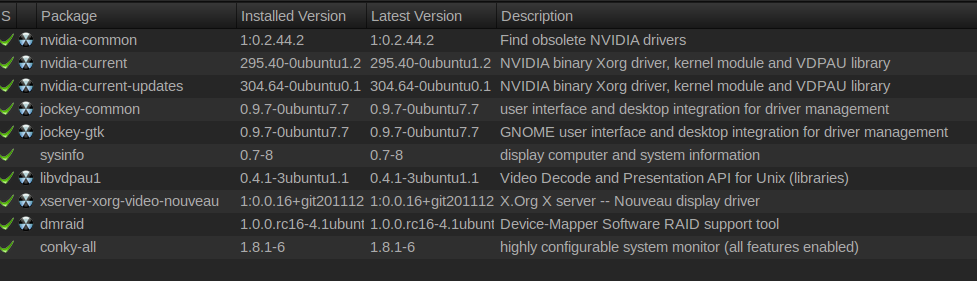
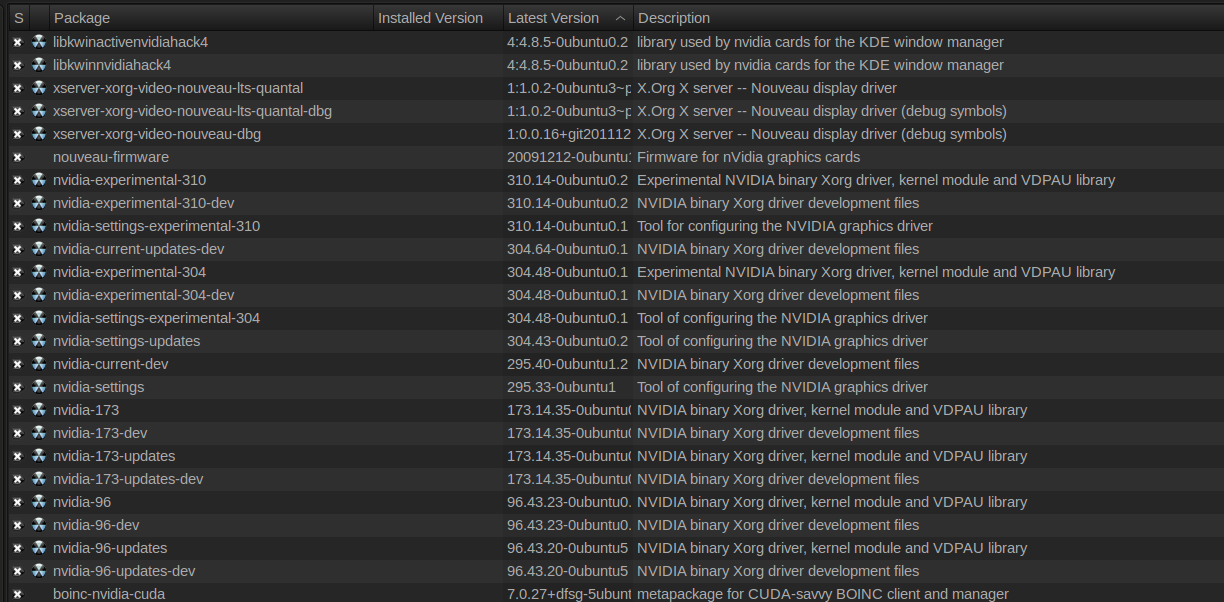
Λοιπον κανοντας αναζητηση στον Synaptic Package Manager για Nvidia μου εβγαλε
τα Installed
και τα Not Installed
Στο προηγουμενο μου ρωτησα πως να να συνεχισω γιατι εαν για το προβλημα που ειχα οταν πρωτοξεκινησα να σας απασχολω εφταιγε ο οδηγος της καρτας γραφικων δεν θα ηθελα να ξαναεγκαταστησω τα ιδια και να γυρισω παλι στο μηδεν.
Εννοειται πως ακομα φαινεται σαν προγραμμα στο μενου μου το Nvidia X Server Settings και μου δινει σφαλμα
και πως με την τωρινη Configuration δεν εχω τα 3D Compiz.
Μηπως μπορειτε να με συμβουλευσετε στο τι να εγκαταστησω/απεγκαταστησω τωρα?
Ζητω συγνωμη για την πολυημερη απουσια μου αλλα ημουν εκτος Αθηνας μακρυα απο τον υπολογιστη μου.
Λοιπον κανοντας αναζητηση στον Synaptic Package Manager για Nvidia μου εβγαλε
τα Installed
και τα Not Installed
Στο προηγουμενο μου ρωτησα πως να να συνεχισω γιατι εαν για το προβλημα που ειχα οταν πρωτοξεκινησα να σας απασχολω εφταιγε ο οδηγος της καρτας γραφικων δεν θα ηθελα να ξαναεγκαταστησω τα ιδια και να γυρισω παλι στο μηδεν.
Εννοειται πως ακομα φαινεται σαν προγραμμα στο μενου μου το Nvidia X Server Settings και μου δινει σφαλμα
- Κώδικας: Επιλογή όλων
Failed to execute child process "/usr/bin/nvidia-settings" (No such file or directory)
και πως με την τωρινη Configuration δεν εχω τα 3D Compiz.
Μηπως μπορειτε να με συμβουλευσετε στο τι να εγκαταστησω/απεγκαταστησω τωρα?
1 Γνώσεις Linux: Ικανοποιητικό ┃ Προγραμματισμού: Καθόλου ┃ Αγγλικών: Πολύ καλό
2 LinuxMint 18.2 sonya 4.10.0-42-generic 64bit (en_US.UTF-8, X-Cinnamon cinnamon), Windows 10
3 AMD Ryzen 7 1700 Eight-Core Processor ‖ RAM 7977 MiB ‖ ASRock AB350 Pro4
4 nVidia GF119 [GeForce GT 610] [10de:104a] {nvidia}
5 enp6s0: Realtek RTL8111/8168/8411 PCI Express Gigabit Ethernet Controller [10ec:8168] (rev 06) ⋮ enp10s0: Realtek RTL8111/8168/8411 PCI Express Gigabit Ethernet Controller [10ec:8168] (rev 06)
6 Screens LG FLATRON W2243S Full HD / Samsung SyncMaster 710N
2 LinuxMint 18.2 sonya 4.10.0-42-generic 64bit (en_US.UTF-8, X-Cinnamon cinnamon), Windows 10
3 AMD Ryzen 7 1700 Eight-Core Processor ‖ RAM 7977 MiB ‖ ASRock AB350 Pro4
4 nVidia GF119 [GeForce GT 610] [10de:104a] {nvidia}
5 enp6s0: Realtek RTL8111/8168/8411 PCI Express Gigabit Ethernet Controller [10ec:8168] (rev 06) ⋮ enp10s0: Realtek RTL8111/8168/8411 PCI Express Gigabit Ethernet Controller [10ec:8168] (rev 06)
6 Screens LG FLATRON W2243S Full HD / Samsung SyncMaster 710N
-
maiandros - babeTUX
- Δημοσιεύσεις: 15
- Εγγραφή: 26 Ιαν 2013, 14:42
- Launchpad: Maiandros
Re: Προβλημα (μαλλον) με την καρτα γραφικων
από Learner » 06 Φεβ 2013, 03:13
Έχεις ακόμη και τους 2 οδηγούς ενεργοποιημένους ταυτόχρονα. Πρέπει να επιλέξεις να έχεις έναν οδηγό (driver) και όχι 2.
Οπότε δοκίμασε να επεγκαταστήσεις τον έναν και να μείνεις με τον άλλο.
π.χ , απεγκατέστησε τον nvidia-current-updates και μείνε με τον nvidia-current.
Έτσι θα δοκιμάζεις τους οδηγούς μέχρι να δεις ποιός δουλεύει. Εγκαθιστάς τον έναν , απεγκαθιστάς τον άλλο.
Οπότε δοκίμασε να επεγκαταστήσεις τον έναν και να μείνεις με τον άλλο.
π.χ , απεγκατέστησε τον nvidia-current-updates και μείνε με τον nvidia-current.
Έτσι θα δοκιμάζεις τους οδηγούς μέχρι να δεις ποιός δουλεύει. Εγκαθιστάς τον έναν , απεγκαθιστάς τον άλλο.
-
Learner - Συντονιστής
- Δημοσιεύσεις: 9766
- Εγγραφή: 08 Νοέμ 2010, 21:24
- Τοποθεσία: Αθήνα
- Launchpad: nicktux
- IRC: NickTux
18 Δημοσιεύσεις
• Σελίδα 2 από 2 • 1, 2
-
- ΣΧΕΤΙΚΑ ΘΕΜΑΤΑ
- ΑΠΑΝΤΗΣΕΙΣ
- ΠΡΟΒΟΛΕΣ
- ΣΥΓΓΡΑΦΕΑΣ
-
- Πρόβλημα με κάρτα γραφικών
ΣΤΗΝ ΔΗΜΟΣΙΑ ΣΥΖΗΤΗΣΗ: Κάρτες Γραφικών / Εικόνα / TV - 6
- 7262
- ΑΠΟ ΤΟΝ:: h_tsopelas
16 Σεπ 2025, 20:43
- Πρόβλημα με κάρτα γραφικών
-
- προβλημα με εγκατασταση Ubuntu 24.04.2 LTS
ΣΤΗΝ ΔΗΜΟΣΙΑ ΣΥΖΗΤΗΣΗ: Γενικά - 6
- 42989
- ΑΠΟ ΤΟΝ:: zattara
01 Μάιος 2025, 18:43
- προβλημα με εγκατασταση Ubuntu 24.04.2 LTS
-
- Πρόβλημα με card reader
ΣΤΗΝ ΔΗΜΟΣΙΑ ΣΥΖΗΤΗΣΗ: Περιφερειακά - 1
- 15157
- ΑΠΟ ΤΟΝ:: h_tsopelas
25 Μάιος 2025, 15:20
- Πρόβλημα με card reader
-
- Μεγάλο πρόβλημα με ανάλυση και πυρήνα 6.14.0-24-generic
ΣΤΗΝ ΔΗΜΟΣΙΑ ΣΥΖΗΤΗΣΗ: Λειτουργικό Σύστημα - 11
- 8230
- ΑΠΟ ΤΟΝ:: per
24 Ιούλ 2025, 19:52
- Μεγάλο πρόβλημα με ανάλυση και πυρήνα 6.14.0-24-generic
Επιστροφή στο Περιβάλλον Εργασίας / Εμφάνιση / Εφέ / Customization